PingPolls shows one question at a time in a chat, and the answer area changes with the question type, so the type you pick decides what your respondent taps or types and what you get back in the Results tab. This page walks through all 13 types, using Rina's form as the example. Rina runs a beauty brand that sells on Shopee and TikTok Shop, and she wants to know which lipstick shade her followers and past buyers want before she pays the factory's minimum order.
How to add a question
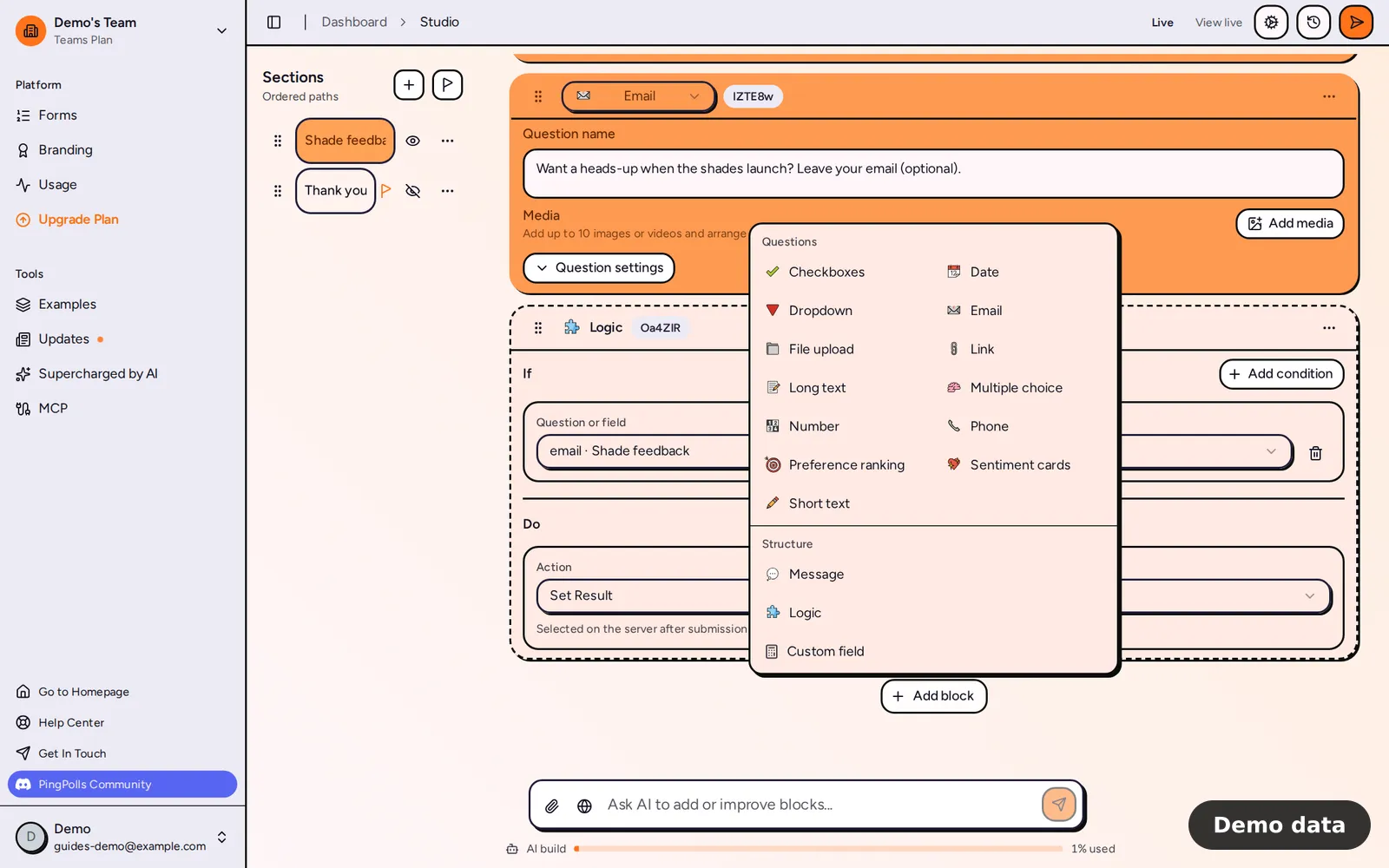
- Open your form in the studio and click Add block.
- Under Questions, pick a type.
- Write your question, then click Question settings to set the field name, the Required switch and the settings that belong to that type.
- Click Preview and answer the question yourself before you publish.
You can change a question's type later with the Answer type selector, but only inside its group of similar types. Short text, long text, email and link swap with each other. Multiple choice, checkboxes and dropdown swap with each other, and so do preference ranking and sentiment cards. Number, date, phone and file upload can't be switched, and whenever you do switch a type, your question text stays.
Text questions
Short text is for a name or a one-line answer, and long text gives the respondent room for a paragraph. On both you can set a minimum and a maximum number of characters, so Rina can ask "What do you wish your current lipstick did better?" and make sure the answer is more than one word. On long text, respondents whose browser supports speech recognition can also speak their answer instead of typing it (see Voice answers).
Email only accepts a valid address. On Pro and Teams you can also turn on Use verified email, so respondents sign in with Google or GitHub and the answer is filled with that email and locked.
Link only accepts a valid URL, such as the link to a review video.
Choice questions
Multiple choice lets the respondent pick one option. Each option can carry an image or a video, you can show number or letter badges next to the options, and the Other option switch adds a field where respondents type their own answer (up to 160 characters).
Checkboxes lets the respondent pick several options, and you set the Minimum selected and Maximum selected. Once the maximum is ticked, the other boxes are disabled.
Dropdown keeps a long list in a picker the respondent can type into to filter. On paid plans it can also load extra options from your own API as the respondent types (see Searchable dropdown).
Card questions
Preference ranking shows two cards at a time and asks the respondent to tap the one they prefer, until every option has a place in the ranking. It takes up to 10 cards, and Certiscore™ times each pick, so a quick choice counts for more than one made after a long pause. Rina uses it for her shades (see Preference ranking).
Sentiment cards shows one card at a time and asks for a quick verdict with a pair of icons, such as Yes and No, Like and Dislike, or Love and Hate. It takes up to 20 cards, and each card is judged on its own (see Sentiment cards).
Numbers, dates, phone numbers and files
Number formats the answer as the respondent types, following the form's language, so "1234" becomes "1,234" in English. You can set a minimum and a maximum, plus a prefix and a suffix of up to 16 characters each, such as "Rp" before a budget question.
Date gives a localized date field with a calendar. After date and Before date can each be a specific day or "Today", so Rina can ask when someone last bought a lipstick without accepting a day in the future.
Phone pairs a country picker with a number field that formats as the respondent types, and you choose which countries are allowed (see Phone number).
File upload gives the respondent a drop zone and an upload button. You set the largest file size in MB, the accepted file types and how many files they can send (see File uploads).
What each type gives you after people answer
Choice questions show as a bar or pie chart in the Results tab. Preference ranking shows your options ranked by score, with the top three marked 👑, 🏅 and ⭐, and sentiment cards show the share of respondents who liked each card. Every other type shows a table of answers.
AI analysis can be switched on for every type except email and phone. Conditional logic can use text, number, date and choice questions as its conditions, while file, phone, preference ranking and sentiment questions cannot drive a condition.
Frequently asked questions
Which question types can I use on the Free plan?
All 13. A few settings inside them need Pro or Teams, namely verified email, loading dropdown options from your own API, and AI analysis of uploaded files.
Is there a rating scale or NPS question?
No, PingPolls has no rating-scale or NPS type. If you want to know how people feel about each idea, sentiment cards give you a verdict per card, and preference ranking puts the ideas in order.
