Bagas's team keeps warranty registrations in an internal system that no off-the-shelf integration reaches, so his developer wants each response delivered straight to an endpoint they control. Webhooks do that. Every response is sent as a JSON POST to your URL, signed with a secret only you and PingPolls know, so your server can reject anything that didn't come from us.
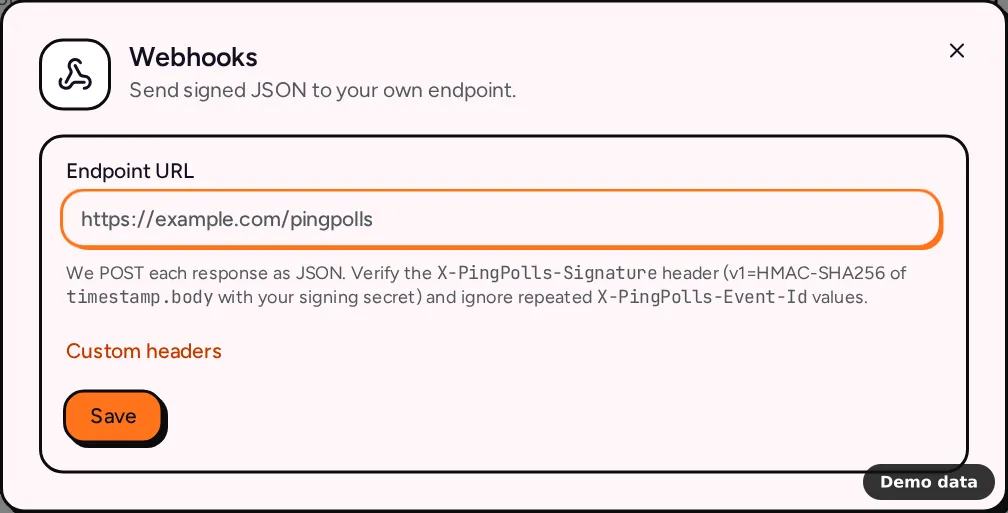
How to add a webhook
- Open your form and go to the Integrations tab.
- Under Automation, click Webhooks.
- Paste your Endpoint URL, for example
https://example.com/pingpolls. - If your endpoint needs its own authentication, open Custom headers, click Add header and fill in a name and value, such as
Authorizationand a bearer token. Headers are stored encrypted. - Click Save. The dialog shows your signing secret with "Copy your signing secret now. It won't be shown again." Copy it into your server's configuration before you close the dialog.
- Click Send a test to post a sample to your endpoint.
Endpoint rules
We only deliver to endpoints that are safe to call from our servers, so saving or sending fails when the URL breaks one of these rules:
- The URL uses HTTPS on port 443.
- The host resolves to public addresses only, never a private or local network.
- Redirects are not followed, so point the URL at the final address.
- Your endpoint answers within 20 seconds.
- Custom headers can't reuse a reserved name.
Host,Connection,Content-Length,Transfer-Encoding, anything starting withProxy-and anything starting withX-PingPolls-are rejected.
If you move the endpoint to a different site, enter the custom headers again, since we only reuse saved headers for the address they were entered for.
What we send
Each response is one POST with a JSON body like this:
{
    "answers": {
        "<question-id>": "<answer as stored by PingPolls>"
    },
    "event": "form.submitted",
    "fields": {
        "<custom-field-id>": "<calculated value>"
    },
    "form_id": "<form-id>",
    "response_id": "<response-id>",
    "submitted_at": "2026-11-06T08:30:00.000Z",
    "version": 1
}
answers holds one entry per answered question, keyed by the question's ID, and fields holds your calculated custom fields, keyed by field ID. submitted_at is an ISO 8601 time in UTC. If you'd rather receive answers keyed by question label, Make and n8n get a flat version of each response that's easier to map.
Every request carries three headers:
| Header | What it holds |
|---|---|
X-PingPolls-Event-Id |
A unique ID for this response and this webhook. It stays the same when we retry. |
X-PingPolls-Timestamp |
The time of sending, in Unix seconds. |
X-PingPolls-Signature |
v1= followed by the hex HMAC-SHA256 of timestamp.body, made with your signing secret. |
How to verify the signature
Join the timestamp header, a full stop and the raw request body, compute an HMAC-SHA256 of that string with your signing secret, and compare it to the value after v1=. Use the raw body exactly as received, because parsing and re-serializing the JSON changes the bytes. Here's a Node.js example:
import { createHmac, timingSafeEqual } from "node:crypto";

function isFromPingPolls(rawBody, headers, secret) {
    const timestamp = headers["x-pingpolls-timestamp"];
    const signature = headers["x-pingpolls-signature"] ?? "";
    const expected = `v1=${createHmac("sha256", secret)
        .update(`${timestamp}.${rawBody}`)
        .digest("hex")}`;
    return (
        signature.length === expected.length &&
        timingSafeEqual(Buffer.from(signature), Buffer.from(expected))
    );
}
Then store the X-PingPolls-Event-Id you processed and ignore a repeat, because a retry sends the same event again. It's also worth deciding how old a timestamp you accept, so an old request can't be replayed against you later.
Delivery and retries
Any 2xx answer counts as delivered. For a 429 or a 5xx answer we try again, honoring your Retry-After header, starting at 30 seconds and doubling up to one hour, for at most 10 attempts. A 401, 403, 404 or 410 answer puts the connection in Needs attention, since it usually means the URL or its credentials changed. Open Activity to see each response, then use Retry failed or the Retry on a single response once your endpoint is fixed.
The test from Send a test has an empty answers object and an event ID starting with test:, so your code can tell it apart from real responses.
Frequently asked questions
Is there a cost?
No. Webhooks work on every plan, including Free. See the integrations overview for everything else you can connect.
I lost the signing secret. What now?
The secret is shown only once. Disconnect the webhook and add it again to get a new one, then update your server.
Are responses sent in order?
Webhook deliveries go out one at a time in runs that start every minute, but retries can change the order, so sort by submitted_at when order matters.
