Elena often agrees with a client that respondent data is kept only for the length of a project, for example 90 days after the last answer comes in. Deleting it by hand across many forms is easy to forget, so she sets a retention period on each form instead. PingPolls then deletes every response once it is older than that period, together with its files and analytics, and Elena can tell her client in writing how long the data stays.
Data retention is part of the Teams plan, and only the form owner or team owner can set it.
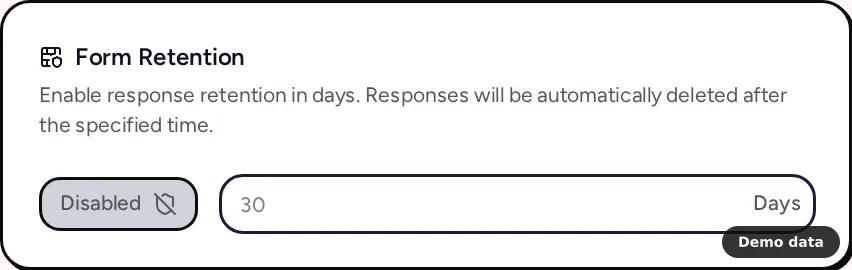
How to set a retention period
- Open the form's overview and go to the Settings tab.
- Find the Form Retention card and click the Disabled button so it reads Enabled.
- Type the number of days in the Retention in days field. The smallest value is 1.
- Click Save settings.
The setting applies to the live form as soon as you save and is copied into the studio draft. To stop deleting responses, click Enabled so it reads Disabled again, then save.
What gets deleted and when
The clock starts from a response's last save, so a response is deleted once that many days have passed since it was last saved. A daily job does the deleting, and each run removes up to 1,000 expired responses along with their uploaded files and their analytics. When more than that expire at once, the rest go on the next runs.
Because the rule looks at every response, turning retention on for a form that already has answers also covers the older ones. If you set 30 days on a form with answers from three months ago, those older responses are deleted at the next run. Export what you need to keep first, and the view and export responses guide shows how to download a CSV.
You can still delete single responses yourself at any time from the Responses tab, which frees their storage straight away.
Plan notes
Retention is only available on Teams. On Free and Pro, the card says "You have to upgrade to Teams Plan to enable this feature." with an Upgrade to set retention button, and any value sent is saved as off. If a Teams plan ends, retention turns off the next time the form's settings are saved. See plans and pricing for the full plan comparison, and team collaboration for the other things Teams adds.
Frequently asked questions
Can my collaborators change the retention period?
No. Retention is one of the settings only the form owner or team owner can change. Collaborators can change the title and language, and see a note that the rest is managed by the form owner. The form settings guide lists who can change what.
Does retention delete the form too?
No. It deletes responses only, along with their files and analytics. The form and its questions stay as they are.
Can I get deleted responses back?
Plan as if you cannot. Deleting a response removes it along with its files, so download a CSV before the period runs out if you might need the data later.
