A custom domain lets your forms open on an address you own, such as forms.yourbrand.com, instead of on pingpolls.com. Bagas prints a QR code on the insert card in every package, and when that code opens his brand's own address, buyers see the name of the brand they just bought from in the address bar instead of a site they have never heard of. You can also connect an email domain, so result emails to respondents come from an address like [email protected].
Custom domains are included in Pro and Teams, and only the team owner can set them up. Each team can connect one form domain and one email domain.
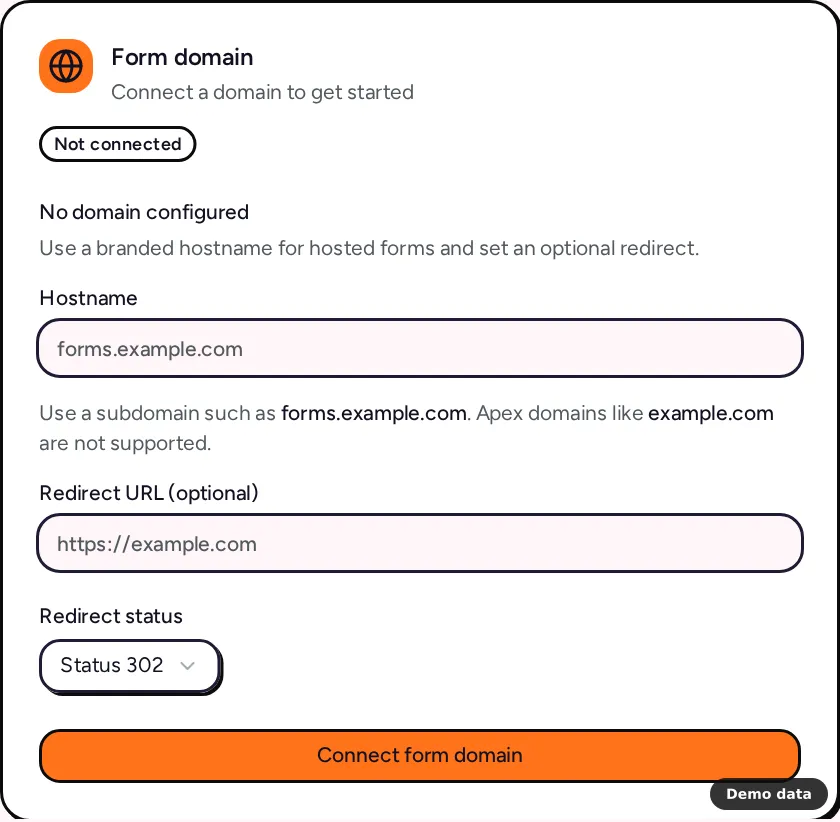
How to connect a form domain
A form domain must be a subdomain, such as forms.example.com. Apex domains like example.com are rejected with "Form domains must use a subdomain, such as forms.example.com".
- Open the account menu at the bottom of the sidebar and click Team. The Team Settings page opens.
- In the Form domain card, type your subdomain in Hostname.
- Optionally fill in Redirect URL and pick a Redirect status (301, 302, 307 or 308). Visitors who open the bare root of your form domain are sent there, and without a URL they go to pingpolls.com with a 302.
- Click Connect form domain. The card now says "Domain verification pending" and lists the Required DNS records.
- At your DNS provider, add each record exactly as the card shows its Type, Name and Value. There is a CNAME record that points your subdomain to
cname.pingpolls.com, and a TXT verification record whose value starts withpingpolls-domain=. The copy button next to each value saves typing mistakes. - Come back to the card and click Refresh. DNS changes can take time to spread, so if the card still says Pending, wait and refresh again later. We also check every domain once a day.
The domain turns Active once our hosting provider confirms both your hostname and its HTTPS certificate. From then on, the card keeps the records under DNS records in case you need them again.
How to open a form on your domain
- Open the form's overview and go to the Sharing tab.
- Switch on the Custom domain channel.
- Optionally type a permalink (3 to 64 lowercase letters, digits and hyphens), or leave it empty to use the form code.
- Click Save sharing.
The form now opens at https://forms.yourbrand.com/ followed by the permalink or form code. The QR code card on the same tab can encode this link, and when both the PingPolls link and the custom domain are on, a Link choice lets you pick which one goes on the print. That is the code Bagas puts in his packages, as described in how to collect feedback with a QR code. More on channels and links is in share your form.
How to send result emails from your domain
- On the Team Settings page, type a hostname such as
mail.example.comin the Email domain card and click Connect email domain. - Add the SPF and DKIM records the card lists at your DNS provider. A DMARC record is recommended but not required.
- Click Refresh until the domain turns Active, which happens once our email provider verifies it.
- In a form's Settings tab, open the Result email card and put an address on that domain in Send from (optional).
Result emails can only be sent from an address on an active team email domain, otherwise saving fails with "Send from an address on one of your verified email domains". The email notifications guide covers the result email itself.
Limits
- One of each: one form domain and one email domain per team.
- Replacing a domain: a pending or failed domain must be removed with Remove domain before you add a different hostname, although you can resubmit the same one. While a domain is still being removed, you cannot add a new one of the same kind.
- Hostname format: at most 253 characters, each label at most 63, using only letters, digits, hyphens and dots.
- One team per hostname: a hostname another team uses is rejected with "Domain already belongs to another team".
- Redirect URL: must be a full http or https address, and localhost or private network addresses are refused as "Unsafe redirect URL".
- Only forms: addresses on your form domain that are not one of your forms return "not found".
- Respondent cookies: on your domain they belong to that domain alone, so they are first-party for your respondents.
Frequently asked questions
Can I use my main domain, like yourbrand.com?
No. Form domains must be a subdomain, so use something like forms.yourbrand.com and keep your main site where it is.
Why does my domain still say Pending?
Your DNS provider may not have published the records yet, or a value was copied with a typo. Check the records against the card, wait a little, and click Refresh.
What happens to my domain if I cancel?
When a paid plan ends, its domains are removed automatically and forms are only reachable on pingpolls.com again. QR codes that point at your domain stop working, so keep the plan active while printed codes are in circulation. See plans and pricing for what else changes.
