Once your form is published, the Sharing tab decides where people can open it. Think of Bagas, who leads CRM at a consumer brand that sells through marketplaces. The marketplace keeps buyer contact details, so he can't email buyers to ask how the product went. A QR code printed on the package card lets buyers open a short feedback form with their phone camera, and he hears from people he could never reach before.
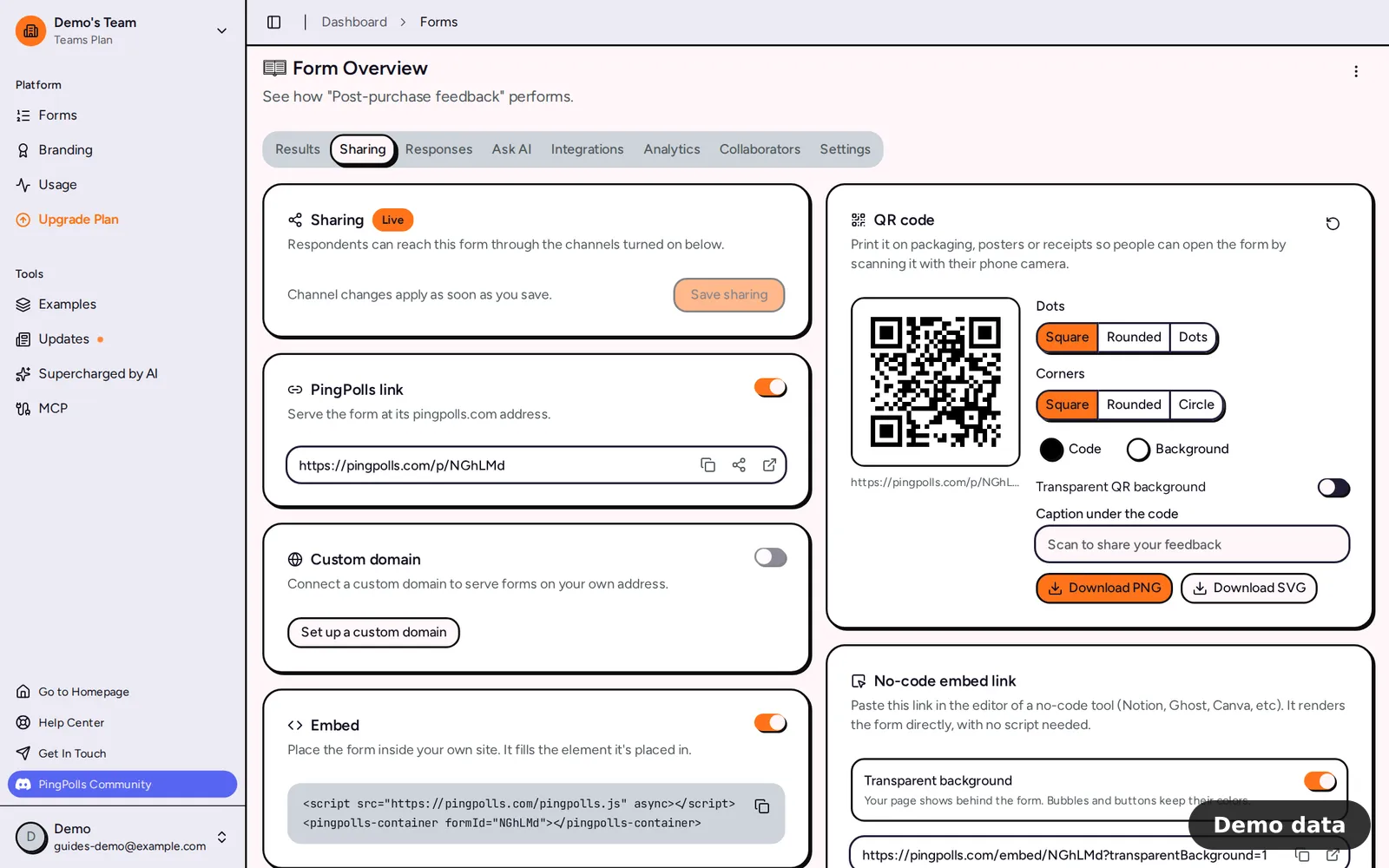
PingPolls serves a form through three channels, and all three are on by default.
- PingPolls link serves the form at its pingpolls.com address,
/p/followed by the form code. - Custom domain serves it on your team's own address, such as
forms.yourbrand.com(Pro and Teams). - Embed places it inside your own website or a no-code tool.
How to share your form link
- Publish your form in the studio. Publishing takes you to the form overview, already on the Sharing tab.
- Check the status badge. Live means respondents can reach the form through the channels that are on.
- In the PingPolls link card, use the copy, share or open button next to the address.
- To use your own address, open the Custom domain card. Without a domain, click Set up a custom domain to go to the Team page (see custom domains). With one, you can set a Permalink, such as
warranty, or leave it empty to use the form code. - Turn off any channel you don't want and click Save sharing.
Only the form owner can change channels, so collaborators see the cards with a note that the owner decides where the form is served.
How to create a QR code for your form
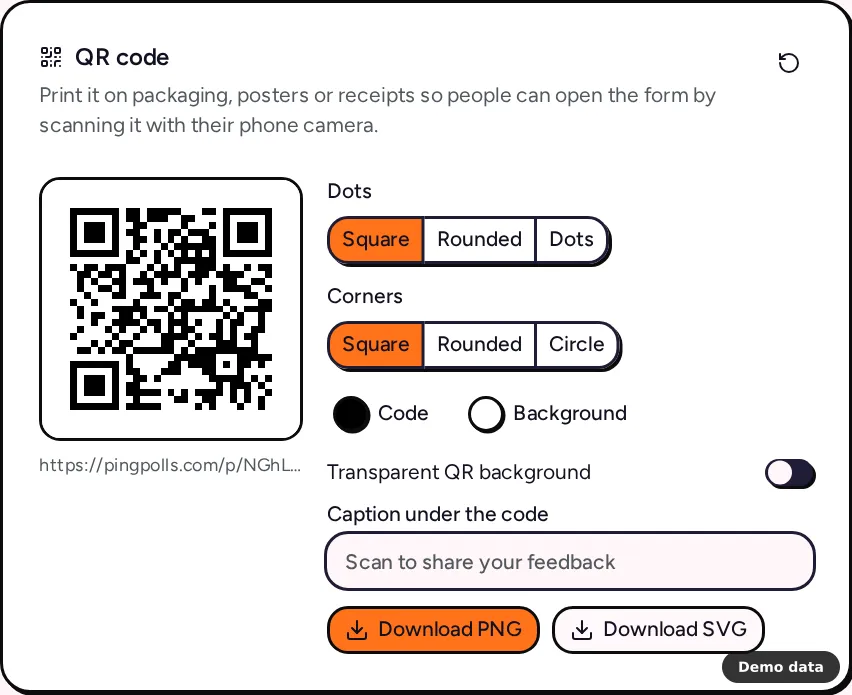
The QR code card turns your saved link into a code for packaging, posters and receipts.
- Make sure the PingPolls link or the Custom domain channel is on and saved. If both are on, choose which one the code opens under Link.
- Pick a style. Dots can be Square, Rounded or Dots, and Corners can be Square, Rounded or Circle.
- Set the Code and Background colors, or turn on Transparent QR background.
- Add a Caption under the code of up to 40 characters, such as "Scan to register your warranty".
- Click Download PNG (1,024 pixels wide) or Download SVG for print. The files are named after the form code, such as
warranty-qr.png.
If the code isn't clearly darker than its background, the card warns "Phone cameras may not read this code", so pick a dark code on a light background before you send anything to the printer. Your style is remembered in this browser only, and the reset button brings back black on white.
For Bagas, the package card works best for things buyers are glad to do after delivery, such as product feedback, warranty registration or an optional WhatsApp opt-in for care tips. Keep the order itself on the marketplace, because marketplaces penalize sellers who move buyers off the platform. The full walkthrough is in how to collect feedback with a QR code.
Archive a form by closing every channel
If you switch every channel off, the button changes to Save and archive and a banner warns that saving takes the form offline everywhere. After saving, you'll see "Sharing saved. The form is archived." Turn any channel back on and save to publish it again. To stop new answers but keep the page open, set a close time in form settings instead.
Frequently asked questions
Why don't I see a QR code?
The QR card needs the PingPolls link or a custom domain to be on and saved. An archived form, or a form shared only through Embed, has no public address to encode.
Does changing the QR style change the link?
No. The style only changes how the code looks. The code always opens the saved link you picked.
Can I send people a link with some answers filled in?
Yes, use the Prefill Links card on the same tab. See prefill links and API. To place the form inside a website, see embed your form.
