Two people can give you the same answer with very different conviction. One picks "Concept A" in under a second, while the other stares at both options for five seconds and then picks it to move on. Most survey tools record both as the same vote. Certiscore™ also records how long each this-or-that pick took and turns that time into a signal of how sure the respondent was, so a quick, confident pick counts for more than one made after a long pause.
This matters for someone like Elena, a researcher who has to defend her findings to a client. When she reports that Concept A won, the client's first question is how strong that preference really is. Certiscore gives her one more quality check to put next to her attention checks and other cleaning steps, which means she can show not only which concept people picked but also how firmly they picked it.
Where Certiscore works
Certiscore runs on the two card question types, because those are the questions where a respondent makes one quick decision at a time.
- Preference ranking (up to 10 options) shows two options at a time and asks the respondent to pick one. Pairs that earlier picks already settle are skipped, and the result is a ranked list with scores.
- Sentiment cards (up to 20 cards) shows one card at a time to answer with an icon pair, such as Yes and No, Like and Dislike, or Love and Hate.
Plain multiple choice, checkbox and dropdown questions don't carry a Certiscore signal.
How the signal is calculated
Each card records the time between the moment it appears and the moment the respondent picks. That time is compared with the same respondent's own quicker picks, so someone who simply reads slowly isn't marked unsure on every card. From there, the timing shapes the score.
- On sentiment cards, a quick answer scores close to a full like (or a full dislike), while an answer given after a long pause lands closer to the middle.
- On preference ranking, an option that won its comparison only after a long pause ends up closer to the option it beat, so a hesitant win doesn't look like a landslide.
You don't need to switch anything on. Every preference ranking and sentiment card question gets these scores, on every plan.
How to read Certiscore in your results
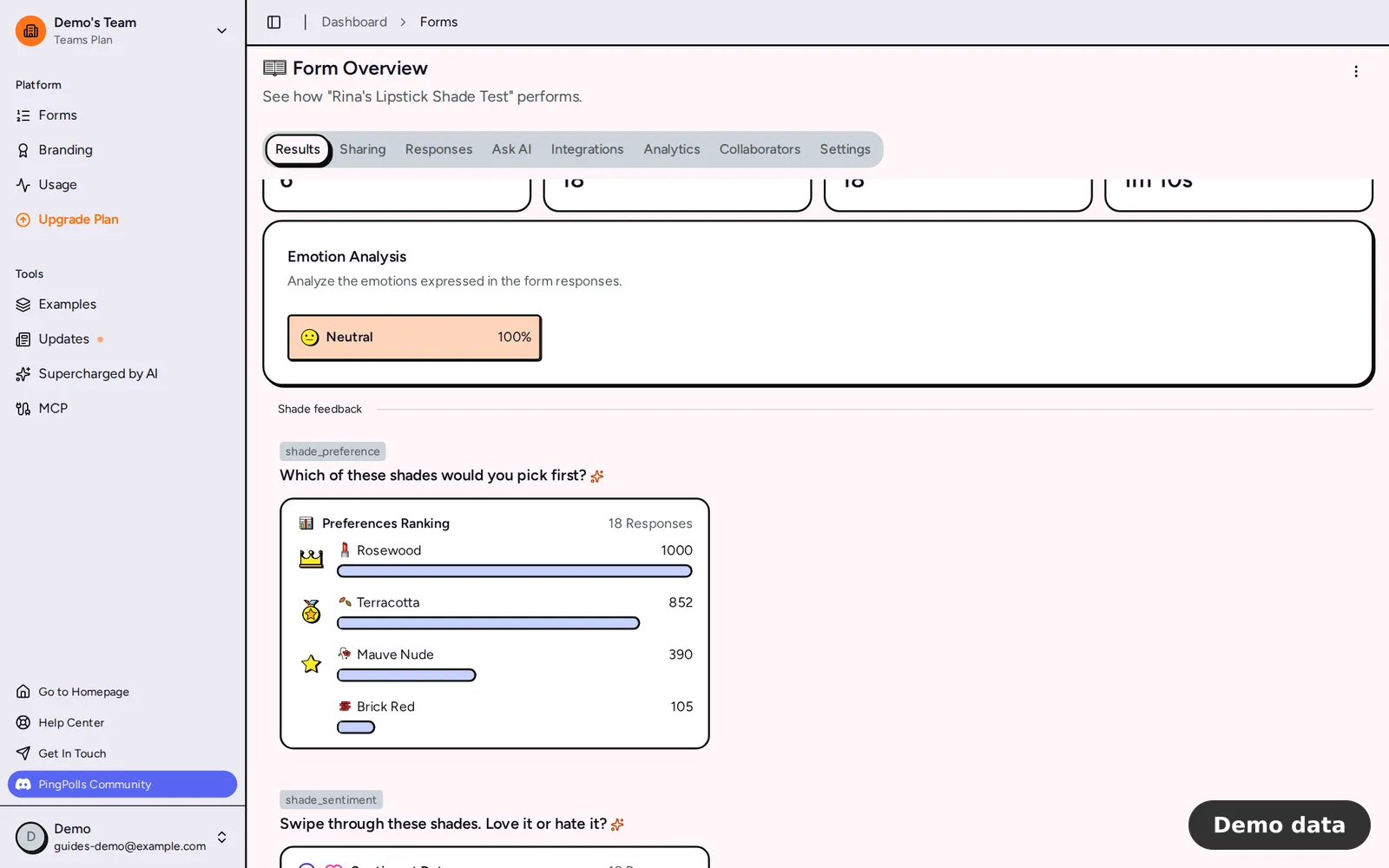
- Open your form from Forms and stay on the Results tab.
- Find your preference question under Preferences Ranking. Options are ranked by score, with the top three marked by a crown, a medal and a star.
- Find your sentiment question under Sentiment Data, which shows the share of respondents who liked each card.
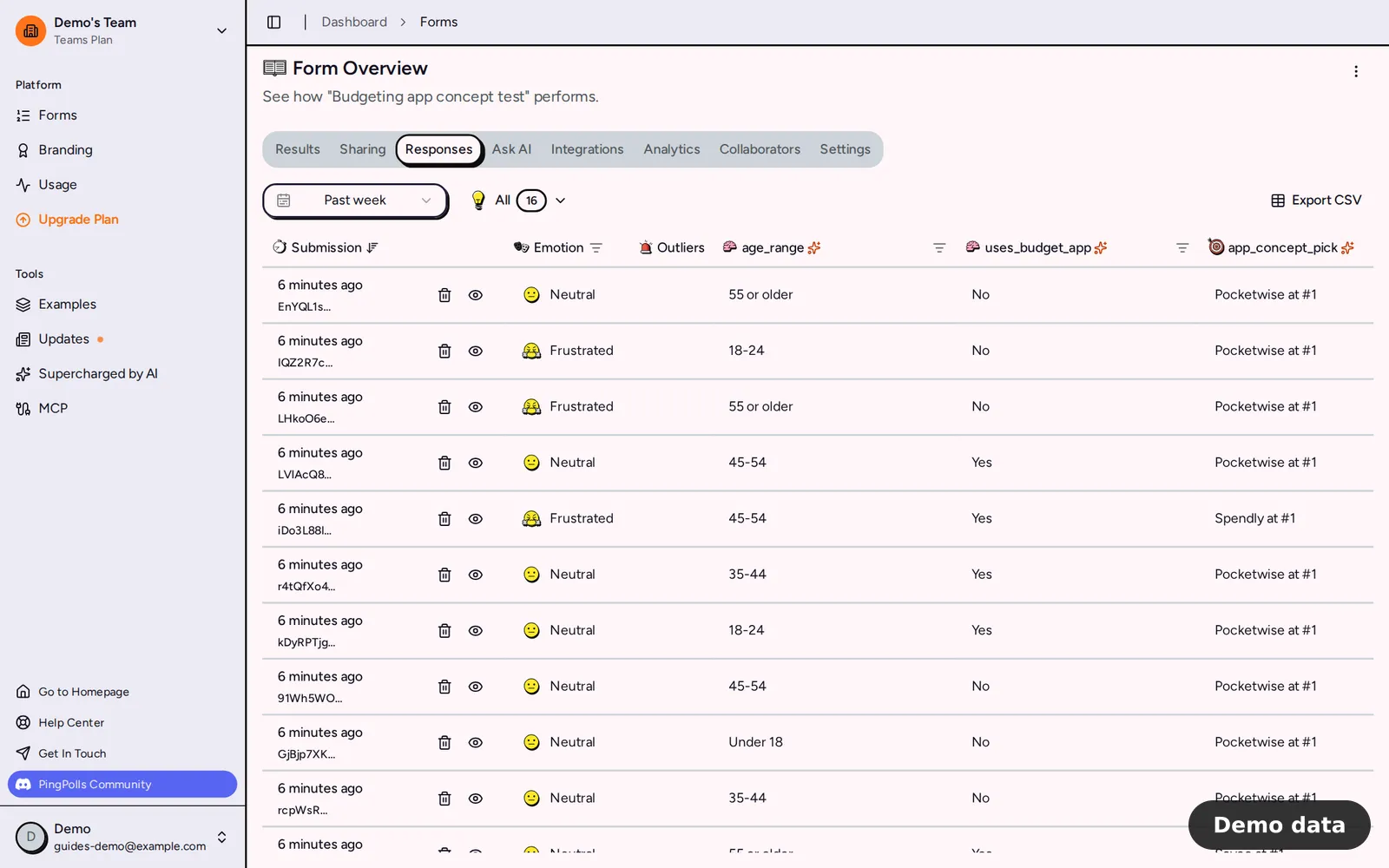
- Switch to the Responses tab to check people one by one. A sentiment card reads "The respondent loves …" only when its like score is above 700 out of 1,000, so a hesitant like stays blank there.
- Export the CSV from the Responses tab when you need the numbers. Rankings and sentiment cards are written as
label: scorelines. See view and export responses.
What Certiscore can't tell you
Certiscore reads timing, so it tells you how sure an answer looked. It can't tell you whether a person or a program answered, and we never present it as a bot detector. Treat it as one signal among several. For checks that decide who can submit at all, such as one response per person and reCAPTCHA, see prevent duplicate responses and spam.
Want the details behind the method? Read how we analyze answers.
Frequently asked questions
Is Certiscore a bot detector?
No. It measures how long each pick took and turns that into a confidence signal. That makes it a useful quality check, but it can't tell a person from a program.
Do respondents see a timer?
No. Respondents simply answer the cards. The timing is recorded in the background.
How do I use Certiscore in a full study?
Pair the card questions with attention checks and duplicate checks, then compare confident and hesitant answers before you report. The walkthrough is in how to check survey data quality.
