Every PingPolls team is on one plan, and that plan decides how many responses you can collect each month, how much you can store and which extras your forms get. Say you are Rina, testing three lipstick shades with your followers before you pay the factory's minimum order. The Free plan already gives you unlimited forms, 100 responses a month, logic, calculated fields and the AI form builder, so you can run that first test without paying anything. You move up when one test turns into many, or when you want your own domain and teammates.
Prices come straight from our payment provider and are shown in US dollars on the pricing page, so this guide covers what each plan includes and how billing works.
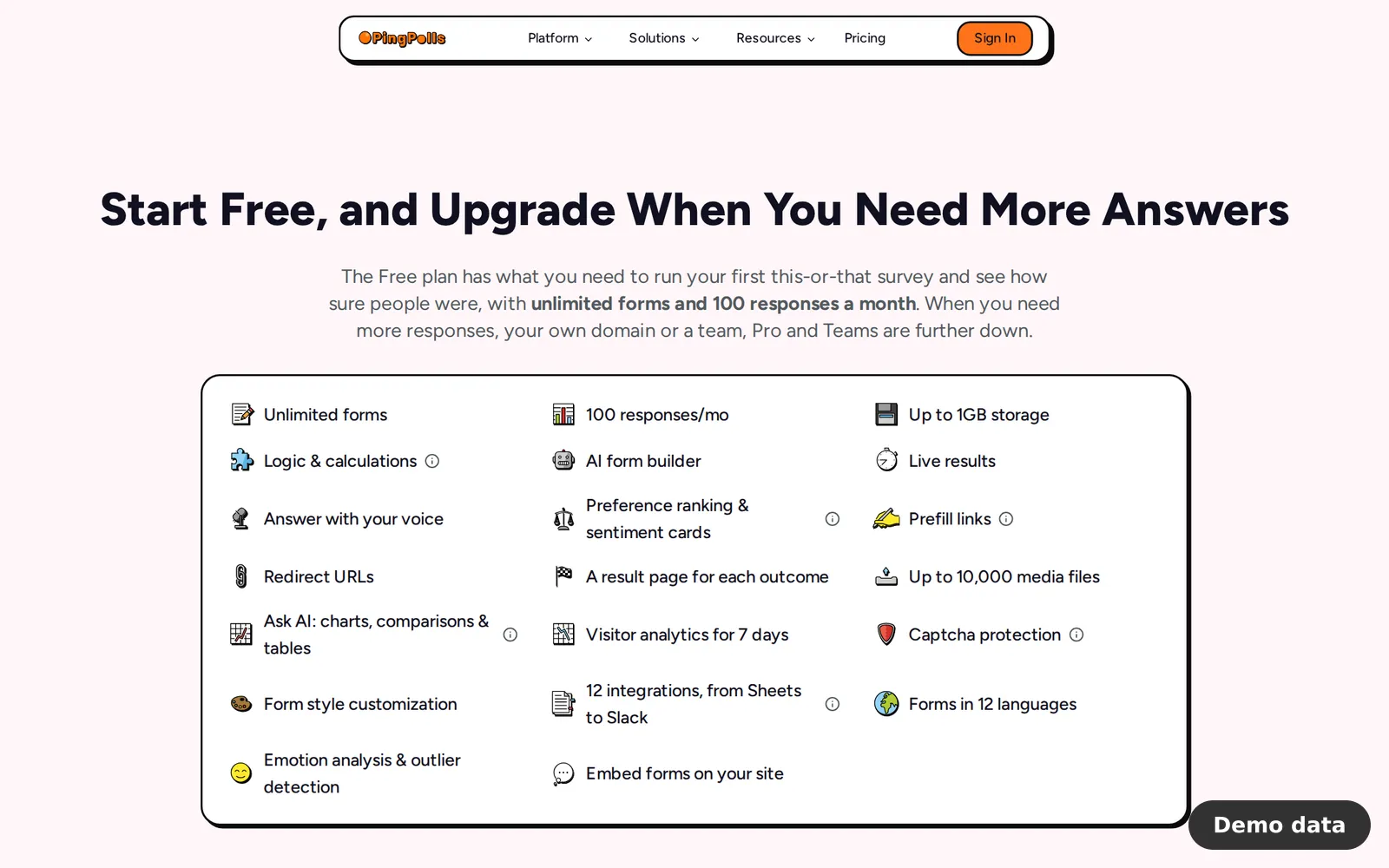
What each plan includes
| Free | Pro | Teams | |
|---|---|---|---|
| Responses per month | 100 | 2,000 | 10,000 |
| Responses with yearly billing | n/a | 24,000 up front | 120,000 up front |
| Seats (owner included) | 1 | 1 | 5 |
| Storage | about 1 GB | about 100 GB | about 100 GB |
| Largest file a respondent can upload | 10 MB | 5,000 MB | 5,000 MB |
| AI form building allowance | included | 10x Free | 50x Free |
| Ask AI allowance | included | 12.5x Free | 62.5x Free |
| Web searches in Ask AI per month | none | 100 | 500 |
| Own logo and social image | no | yes | yes |
| Custom domains | no | yes | yes |
| Password protection | no | yes | yes |
| Verified respondent sign-in | no | yes | yes |
| Partial responses | no | yes | yes |
| Result email | no | yes | yes |
| Advanced integrations | no | yes | yes |
| Data retention | no | no | yes |
Pro and Teams also get PDF context in the AI builder, searchable dropdowns that load options from your own API, AI analysis of uploaded files, and analytics ranges beyond 7 days with a per-question funnel. Every plan uses the same AI model and can store up to 10,000 media files, and logic, custom fields, colors, fonts and styles are free on every plan.
Which plan fits you
Free suits a first test, because 100 responses a month is enough to see which of Rina's shades her followers prefer. Pro is built for one person who needs more responses, their own domain and the paid features, so it fits Rina once she runs a test before every launch and wants the form to carry her own logo. Teams is for up to five people who share forms and need 10,000 responses a month, and it is the only plan with data retention.
How to upgrade
Only the team owner can buy or change a plan. Other members see "Contact your team admin to upgrade plan" instead of the plan cards.
- Click the plan button in the sidebar, or any upgrade button you meet in the app (for example "Upgrade to set a password" in a form's settings). The dialog "Upgrade Plan for" your team name opens.
- Pick the Yearly or Monthly tab. Yearly is selected first and carries a "~23% off" badge.
- Click Get Started on the Pro or Teams card. You are sent to the payment provider's checkout.
- Pay there. Your Billing page (in the account menu at the bottom of the sidebar) checks every few seconds until the payment is confirmed, then shows your plan and its features.
Monthly or yearly billing
Monthly billing grants 2,000 responses (Pro) or 10,000 responses (Teams) every month. Yearly billing costs about 23% less and grants the whole year's responses at once, which is 24,000 on Pro and 120,000 on Teams, so a busy launch month can use more than a twelfth. AI allowances reset about every 30 days on both.
Extra responses when you run out
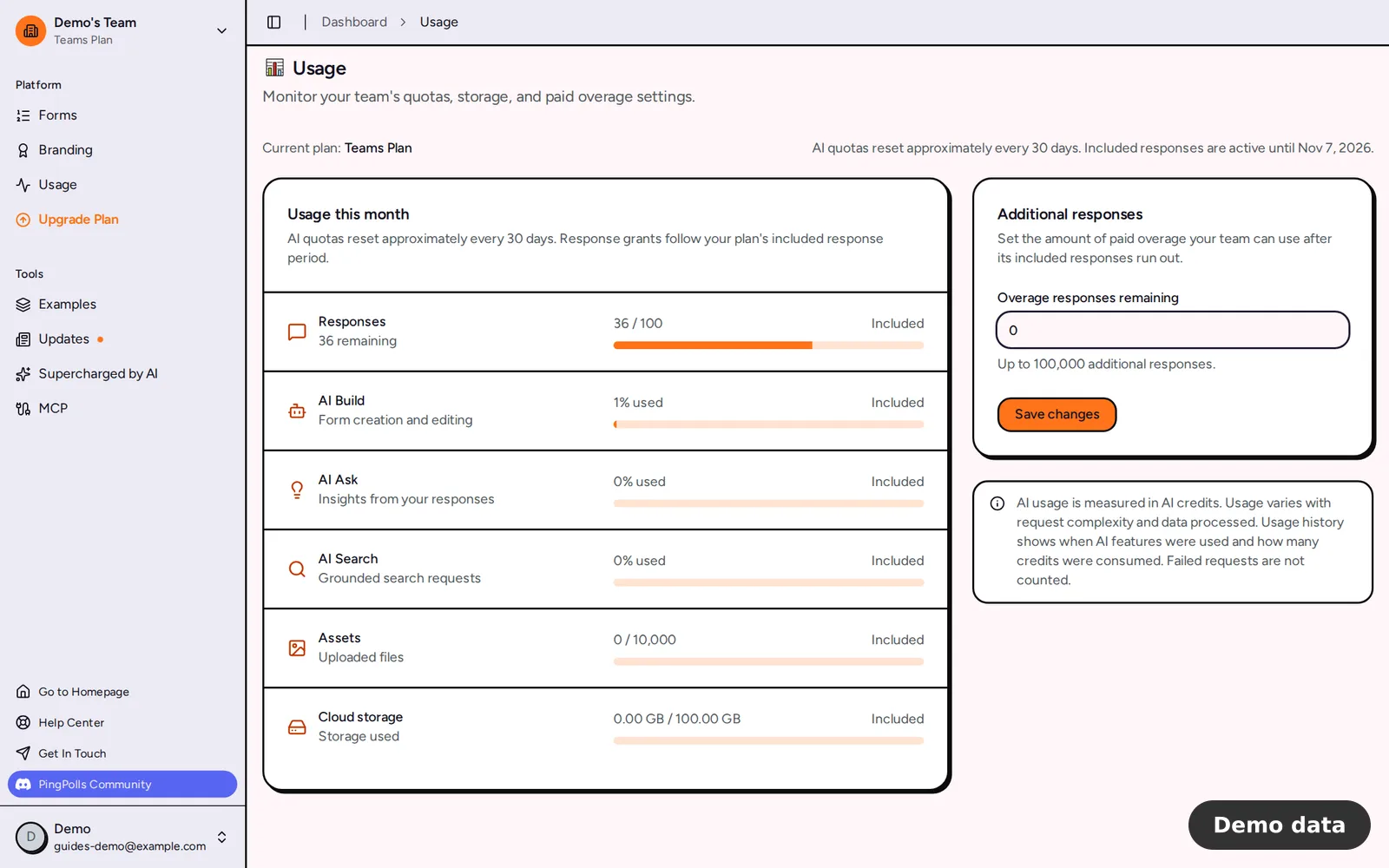
When a paid team uses up its included responses, the owner can keep paid extras in reserve. Open Usage in the sidebar and set Overage responses remaining, up to 10,000 on Pro or 100,000 on Teams. Additional responses cost 1 per 100 responses), and they are only used after your included responses reach 0. If a team has no responses left at all, its forms still open but say they are not accepting responses.
Changing or cancelling a plan
To switch between Pro and Teams, open the same dialog and click Change Plan. PingPolls shows the prorated charge with tax, credits applied and the total due, and Continue stays disabled until you tick the Terms box. A change is refused within 2 days of subscribing, with "You must wait at least 2 days before changing plan".
To cancel, click Manage Subscription on the Billing page, which opens the payment provider's customer portal. Your plan stays active until the end of the period you paid for, and the Billing page shows "Cancellation Scheduled" until then. There are no refunds for time already paid.
What happens when a paid plan ends
The team goes back to Free values, so it gets 100 responses a month and no extra responses. Custom domains are removed, password-protected forms stop opening, your saved social image is kept but no longer shown, and paid integrations stop with "requires a paid plan". Partial responses, retention and result email turn off the next time a form's settings are saved. Teammates are not removed, but you cannot invite new ones.
Frequently asked questions
Is the Free plan really free?
Yes. It needs no credit card and includes unlimited forms and 100 responses every month.
Do partial responses use my monthly responses?
No. Only a finished submission spends a response, so partial responses are free to keep.
Can my teammates see how much we have used?
Yes. The Usage page follows the active team, so every member sees the same numbers as the owner. Only the owner can buy, change or cancel the plan.
