Many students keep their thesis project in Notion, with the study description, the timeline and the notes for a supervisor all on one page. When you recruit participants with a public Notion page, putting the questionnaire on that same page means people read your participant information and answer in one place, and your supervisor can see exactly what participants see.
Notion's embed block takes a link and shows that page in a frame. Notion's help asks for an address that starts with https, not iframe code, so the embed code with the PingPolls script doesn't belong in Notion. What you paste there is the no-code embed link, which PingPolls makes for tools like Notion, Ghost and Canva. The Notion steps below follow Notion's own help article on embeds.
Before you start
Your questionnaire must be published, and its Embed channel must be on and saved. Open the Sharing tab of the form overview, check the switch in the Embed card, and click Save sharing if you changed it. While Embed is off, the no-code embed link card says "Turn on Embed to share the form through embed links."
Step 1: Copy the no-code embed link
- Open your form in the dashboard and go to the Sharing tab.
- Find the No-code embed link card.
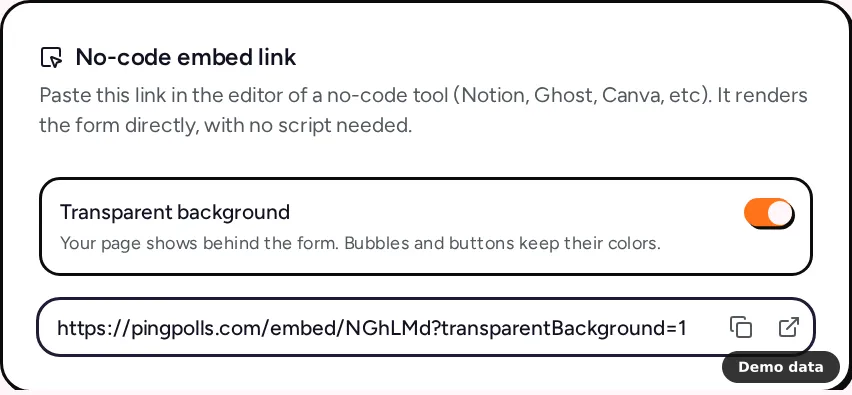
- Decide on Transparent background. With it on, your Notion page shows behind the form, while bubbles and buttons keep their colors. The switch only changes the copied link, so nothing is saved.
- Click Copy no-code embed link. The link looks like
https://pingpolls.com/embed/your-form-code?transparentBackground=1.
If the card says "Save sharing first; embed links only work while the saved Embed channel is on.", click Save sharing before you copy. Embed your form explains each embed option.
Step 2: Add an embed block in Notion
- On your Notion page, type
/embedand press Enter. You can also hover over a new line, click the+on its left and choose Embed. - Paste the no-code embed link into the menu that appears.
- Click Embed link.
- Hover over the embed and drag the bars on its sides to resize it. Give it enough height for a few chat bubbles and the answer field.
Open the page as a participant would (for example in a private browser window if the page is public) and answer the questionnaire once, so you know the whole flow works before you send the page around.
Make the form fit a calm Notion page
Notion pages are mostly plain text, so a quiet theme keeps the questionnaire from looking like an advert in the middle of your study description. In the studio, open the Form Setup drawer and its Theme tab to choose the color, font and style (all included on the Free plan), and keep Transparent background on in the no-code link so the Notion page shows behind the bubbles. Customize your form explains each setting.
What to know about Notion embeds
The no-code link gives you a plain frame, which keeps things simple, but a few behaviors are different from the embed code you'd use on a website.
- Height is fixed. The form takes the height you drag the block to, because the script that resizes PingPolls forms can't run inside Notion.
- Phones are smoother on the PingPolls link. On a website, the embed script tells the form how much of the frame an on-screen keyboard covers, so the answer field stays visible. Notion can't run that script, so for participants who will answer on their phones, also share the PingPolls link from the PingPolls link card in the Sharing tab.
- Duplicate checks still work. Embedded respondents get a signed token tied to the page that embeds the form instead of a cookie, so one response per browser applies inside Notion too. Prevent duplicate responses and spam explains how to add more checks.
- Every answer lands in the same form. Responses from the Notion page and from the PingPolls link appear together in the Responses tab, and your CSV export includes both. See View and export responses.
If Notion shows an error instead of the form, the most common cause on the PingPolls side is the Embed channel being off, so turn it on and click Save sharing. Notion's help also notes that some sites block embedding, while PingPolls embed links are made to be framed for as long as your saved Embed channel is on.
Frequently asked questions
Can I paste the embed code instead of the link?
No. Notion's embed block asks for a link starting with https, so paste the no-code embed link. The embed code with <script> is meant for website builders such as WordPress, Webflow and Framer.
Will my supervisor see responses if they open the Notion page?
No. The Notion page shows the questionnaire, not your data. Your supervisor sees responses only if you add them to the form as a collaborator, which needs the Teams plan, or if you share an export with them.
Does embedding in Notion need a paid plan?
No. The Embed channel works on every plan, including Free. See How to create a thesis questionnaire you can defend for building the questionnaire itself.
