If your brand site runs on WordPress, a warranty registration or feedback form works best when it sits on that site instead of behind a link to somewhere else. Buyers who type your domain from the box or find you through search can then register their product on a page that looks like yours, and every answer still lands in PingPolls with the rest of your responses.
This guide shows you how to copy the embed code from PingPolls, paste it into a WordPress Custom HTML block and size it. The steps follow the block editor as described in WordPress's own documentation for the Custom HTML block.
Before you start
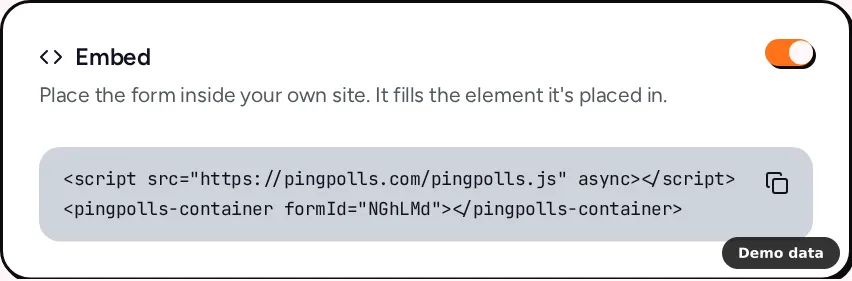
Your form needs to be published, and its Embed channel needs to be on. Both are set in the Sharing tab of the form overview, where the Embed card has a switch. If you change the switch, click Save sharing, because an embed only loads while the saved Embed channel is on. Otherwise the page shows "This form is not available in this mode."
You also need a WordPress account that can save scripts and iframes. WordPress removes <script> and <iframe> tags from a Custom HTML block when the person saving it lacks the unfiltered_html capability (a Contributor, for example), so if your role doesn't have it, ask someone whose role does to add the block.
Step 1: Copy the embed code from PingPolls
- Open your form in the dashboard and go to the Sharing tab.
- In the Embed card, click Copy embed code. You'll see "Embed code copied".
The code has two lines, the embed script and a container that holds your form.
<script src="https://pingpolls.com/pingpolls.js" async></script>
<pingpolls-container formId="your-form-code"></pingpolls-container>
The container takes a height attribute, so add one to give the form a fixed height on your page, for example <pingpolls-container formId="your-form-code" height="640"></pingpolls-container>. Embed your form explains every option.
Step 2: Add a Custom HTML block in WordPress
- Open the page or post in the WordPress block editor.
- Click the Block Inserter icon and add a Custom HTML block. You can also type
/htmlin a new paragraph block and press Enter. - Click Edit HTML to open the editing window, paste the embed code, and check the preview that appears next to the code.
- Click Update to close the window, then update or publish the page as usual.
Open the live page on your phone and answer the form once. The embed script tells the form how much of its frame an on-screen keyboard covers, so the answer field stays above the keyboard while buyers type.
Use an iframe instead (optional)
If you'd rather paste a plain iframe, copy the address from the No-code embed link card on the same Sharing tab. Its Transparent background switch lets your page show behind the form while bubbles and buttons keep their colors, and it only changes the copied link, so nothing is saved.
<iframe
    src="https://pingpolls.com/embed/your-form-code?transparentBackground=1"
    width="100%"
    height="640"
    style="border:0"
    allow="microphone"
></iframe>
The allow="microphone" part matters if your form has long-text questions, because respondents can answer those by voice and the browser needs permission for the microphone inside the frame. The embed script adds that permission for you, which is one reason we suggest the embed code first.
Make the form look like part of your site
A form that matches your brand colors reads as part of your site, which helps when buyers are registering a warranty and want to know they're in the right place. In the studio, open the Form Setup drawer and its Theme tab to set the color, font and style, all of which are included on every plan. Adding your own logo needs Pro or Teams. When you're happy with the look, click Set globally to save it to your team, so the next form you build (your QR feedback form, for example) starts with the same theme. Customize your form walks through each setting.
Good to know
- Duplicate responses still work. Embedded respondents get a signed token tied to your page's address instead of a cookie, so the default of one response per browser applies on your WordPress page too. Prevent duplicate responses and spam explains the other checks.
- Branding is optional. On Pro and Teams, a team with its own branding can hide the PingPolls logo in embeds, and Remove PingPolls branding shows how.
- Prefill links can open in embeds. A prefill link made for the Embed channel is tied to the site that embeds the form, so it asks for that site's origin when you create it, as described in Prefill links and API.
- The script stays light. It never sets a cookie, and browsers cache it for an hour, so your page stays fast.
Frequently asked questions
Why does my page show "This form is not available in this mode."?
The Embed channel is off, or it was switched on without saving. Open the Sharing tab, turn on Embed and click Save sharing.
Why did my embed code disappear after I saved the page?
WordPress strips scripts and iframes from Custom HTML blocks saved by users without the unfiltered_html capability. Ask someone whose role has it to paste the code and save the page.
Do I need a paid plan to embed?
No. The Embed channel works on every plan, including Free. Hiding the PingPolls logo needs your own branding on Pro or Teams.
